 The Fastest Mouse Clicker, OP AutoClicker Record Play, et al. | Official Site
Official Site of The Fastest Mouse Clicker for Windows, The Fastest Mouse Clicker for Linux, OP AutoClicker Record Play for Windows, 2048 Game Professional AutoClicker Mod, other full-featured applications without Ads, cookies, tracking, spying, and collateral personal data leaks.
Download the latest version : 3.0.1.0
( mirror ) - read ChangeLog
Featured project: 183 , 34 , 71266807
Site map
- windows2048.com | Home
- The Fastest Mouse Clicker for Linux
- The Fastest Mouse Clicker for Windows
- Fast Mouse Clicker vs. Speed AutoClicker vs. Terminator vs. others
- OP AutoClicker Record Play for Windows (AutoClicker2)
- 2048 Game Professional AutoClicker Mod
- Bézier Curve: AI-Powered Human-Like Mouse Movement
- Best Auto Clicker Settings for Popular Games
- Click Speed Test
- Mouse Polling Rate
- Multiple Display Setups
- Auto Clicker Setup for Seniors with Arthritis
- The Fastest Mouse Clicker for Windows | Disambiguation
- The Fastest Mouse Clicker for Windows | Features
- The Fastest Mouse Clicker for Windows | Help How To Use
- The Fastest Mouse Clicker for Windows | Screenshots
- The Fastest Mouse Clicker for Windows | Source Code
- The Fastest Mouse Clicker for Windows | Technology
- windows2048.com | Terms of Service
- windows2048.com | Updater Component
- windows2048.com | About
The Fastest Mouse Clicker for Windows
The fastest auto-clicker for Windows PC. 100000 clicks per second by arrays in Win32 SendInput() API. Command line, random clicking, sequences of clicks
Updated : Apr 01 2026.
2026 is the project’s 10th anniversary
Quick Start
The Fastest Mouse Clicker for Windows version 3 is the most advanced, high-performance automation utility engineered for Windows 10 and 11 (and unofficially for Windows 7). Built on a low-latency C++/Qt framework, The Fastest Mouse Clicker for Windows version 3 utilizes the Win32 SendInput() API (the cross-platform version 3 achieves that via libuiohook library) to bypass standard software bottlenecks, delivering record-breaking click speeds that exceed 100,000 clicks per second (CPS).
To ensure compatibility with modern games and applications like Minecraft or Roblox, The Fastest Mouse Clicker for Windows version 3 includes advanced “Humanization” algorithms:
- Randomized Time Intervals: Set a variance range (e.g., 0% to 50% compared to your selected average interval) to mimic human clicking patterns and bypass basic auto-clicker detection.
- Randomized Coordinate Offsets: Add slight pixel-randomization (e.g., 0px to 50px) to your click location to prevent “static-click” flagging in Minecraft, Roblox.
The Fastest Mouse Clicker for Windows Classic is the original, battle-tested Windows-only edition of one of the most popular open-source auto-clickers in the world - with over 183 GitHub stars. It is a single self-contained 64-bit native Win32 application, statically linked with zero external runtime dependencies, and engineered to push mouse-click automation to the absolute hardware limit.
The secret behind its record-breaking throughput is a carefully crafted use of the Win32 SendInput() API with the input event arrays. Rather than issuing one synthetic mouse event per system call, the application batches hundreds of INPUT structures into a single SendInput() call, saturating the OS input queue and achieving verified click rates of up to 100,000 clicks per second (CPS) - a result no conventional auto-clicker can match.
Comparison: Classic vs. Version 3
| Feature | Classic 2.1.7.0 | Version 3.0.1.0 |
|---|---|---|
| Platform | Windows only | Windows, Linux, macOS, FreeBSD (cross-platform) |
| Framework | Pure Win32 API | C++ / Qt + libuiohook |
| Max Clicks Per Second (CPS) | 100,000+ | 10,000+ |
| Random clicking | Command line (-r) |
GUI |
| Humanization (random intervals) | No | Yes |
| Humanization (random area) | No | Yes |
| 4K support | Yes | Yes |
| Static binary / no dependencies | Yes | Yes (static Qt runtime) |
| License | GPLv3 | GPLv3 |
You can test this or other app or your fingers, how quickly could they actually click, by our vanilla in-browser JavaScript Click Speed Test.
Take a look at The Fastest Mouse Clicker for Linux! It has the same code base with The Fastest Mouse Clicker for Windows Classic.
The Fastest Mouse Clicker for Windows version 3
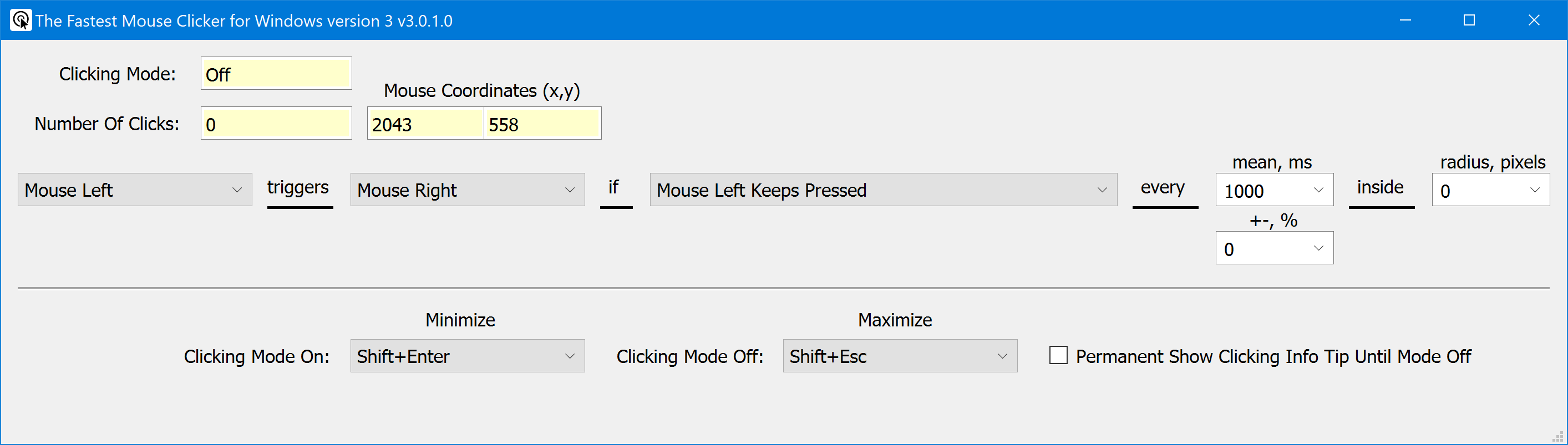
Ready.
The Fastest Mouse Clicker for Windows Classic
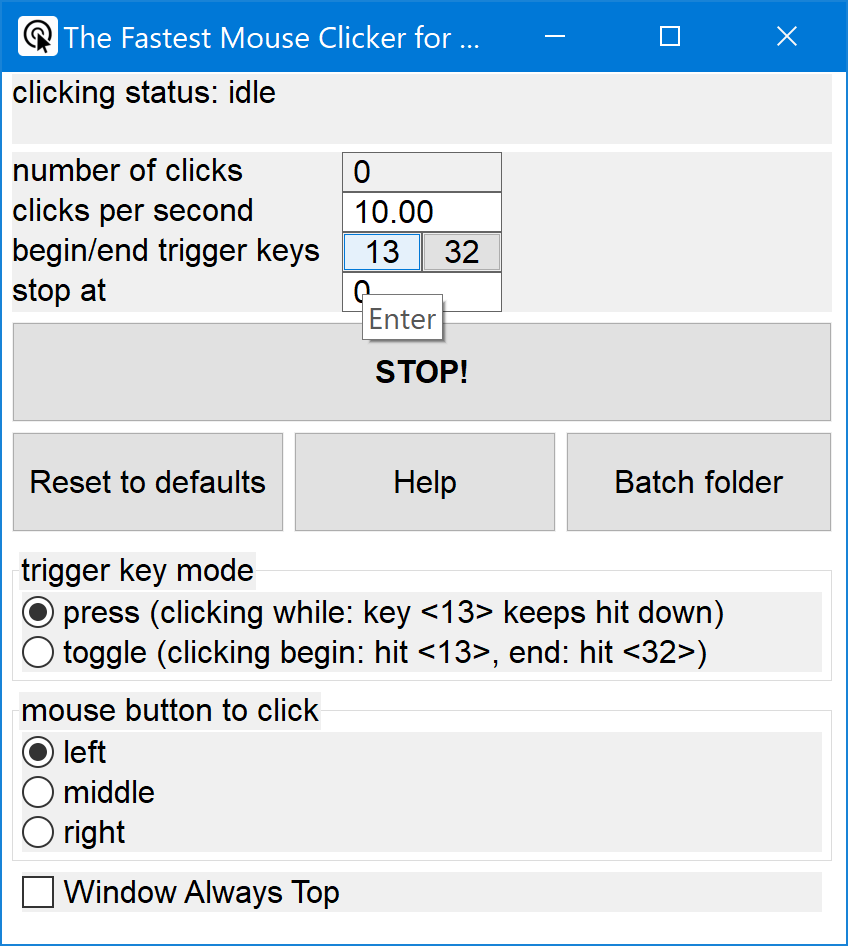
Ready.
What’s New - The latest version 3.0.1.0
ChangeLog
- Written from scratch cross-platform 64-bit application utilizing Qt, libuiohook technologies.
- Various mouse buttons and wheel rotations can trigger key pressed events and vice versa.
- Supports random mouse clicking in both time intervals and screen coordinates.
- Ultimately clean UI supports nice tooltip hint in the bottom right display corner while main window is minimized.
- Ideal for Roblox and Minecraft.
What’s New - The classic version 2.1.7.0
ChangeLog
- Recompiled as 64-bit application.
- Added long-awaited tooltips for the trigger keys.
- Fixed blurred GUI texts on 4K screens.
- Fixed: GitHub issue #20: Keyboard and Mouse locked and hardly able to control when pressing TOGGLE stop key.
- Few minor bug fixes.
Found a bug or want a new feature? Create the issue!
Warning
Please update your URLs:
— https://sourceforge.net/projects/fast-mouse-clicker-pro/
— https://sourceforge.net/projects/fastclicker/
are obsolete and points to the wrong locations.
Official site is here.
Introduction
This is the official site to download various versions of The Fastest Mouse Clicker for Windows version 3. Introducing the fastest mouse clicker you have ever experienced!
Tired of slow, unresponsive mouse clickers that just don’t do the job? Look no further! Our revolutionary new mouse clicker app for Windows is here to change the game.
We take pride in utilizing the hidden power of the Win32 SendInput() API, which sets our app apart from all the competitors. This unique technology allows us to guarantee that our app is the fastest and most efficient mouse clicker available on the market.
Boost your productivity and gaming experience with these incredible features:
-
Unrivaled Speed: Say goodbye to lags and delays, our superior Win32 SendInput() API integration provides the smoothest and quickest mouse clicks you’ve ever experienced.
-
Customizable Settings: Tailor your click rates and intervals to your specific needs, save presets, and switch between them with ease.
-
Easy-to-use Interface: Navigate through the app effortlessly with our sleek and user-friendly design.
-
Perfect for Gamers and Professionals: Whether you’re into MMORPG’s, time-limited tasks, or data entry, our mouse clicker app enhances your performance and reduces strain on your hands.
-
Regular Updates: We constantly aim to improve and provide you with the latest features - our app evolves with you.
-
Trusted by Thousands: Join our growing community of satisfied users who have experienced the power of the fastest mouse clicker app for Windows.
There are a lot of use-cases of The Fastest Mouse Clicker for Windows version 3. Amateurs can use it for cheating in various web sites or video games such as Counter-Strike: Global Offensive (CS:GO), Candy Crush Saga, Roblox games, etc. Professionals can use it for quality assistant and testing purposes because full support of command line in batch files, PowerShell scripts, etc.
Video reviews from our users
Wolf0626, young vlogger shows how he downloads, installs and runs The Fastest Mouse Clicker for Windows on his PC. Watch the review video "How to Download the fastest mouse clicker for windows!!!" in Youtube.
BullyWiiPlaza, experienced youtuber shows how he cheats extra scores with The Fastest Mouse Clicker for Windows in his mature gameplay. Watch the review video "[Yu-Gi-Oh! Duel Links] The Fastest Auto Clicker for Windows Gameplay" in Youtube.
Frequently Asked Questions (FAQ)
Does the clicker work when its main GUI window is minimized?
Yes, it does. Trigger keys are being intercepted and mouse events are being emitted regardless the application window state is: normal, maximized, minimized, focus, blur, etc.
What if I want to emulate 2 clicks within every 3 seconds, what the ‘clicks per second’ parameter should be?
You have to type 0.67 inside ‘clicks per second’ input field. Just click on it, delete previous value, and type new one.
What is minimal Windows version supported?
Your PC must have Windows 7 or later. Don’t use Windows XP. Better use Windows 10. Windows 11 is also supported.
When I open many windows simultaneously on my desktop and start to emulate mouse clicks, I lose the GUI window of the app. Why?
That’s because you forget about checkbox named “Window Always Top”. It is specially designed to prevent such a situation. Once you check it, main GUI window of the program will be layered always topmost (above all the other windows on your desktop).
What about sequences of clicks?
Work with sequences of clicks is supported since v2.5.x.x. To avoid GUI complication, second “Group” application is implemented. To run that app from main “Single” app just press a “Run group app” button. To return to main app press “Run single app” button.
Does your program run on bare Windows, like Windows Home on a laptop just from store?
Yes. Unlike all other auto-clickers this app is statically linked and has no external dependencies (e.g. “The application was unable to start correctly (0xc000007b)” from incorrect linkage against MSVC run-time DLLs).
Does your app support multiple subsequent mouse clicks?
Yes, it does. But the Help text is not ready yet. Although the GUI is simple and intuitive and based on the one of the most famous auto-clickers in the past. To do subsequent clicking, just run the main app, click the “Run group app” button and see the “Quick Help” area just below the center of the window.
I observe many other auto-clickers do not support 4K displays. What about your one?
I did that work essentially and have fixed that issue by adjusting font sizes on the fly and embedding a proper xml manifest into app binary.
Is this FAQ nearly complete?
Oh no :) It has been just started. Feel free to ask your question via email. See the Contacts chapter below.